

Building a Spotify MCP Server with PKCE Authentication
Building a Spotify MCP Server with PKCE Authentication
Wondering how many times you've listened to "The Life of a Showgirl" already? Or want to know if your "definitely eclectic" music taste is actually just the same five bands on repeat?
Building a Spotify MCP server is your ticket to finally understanding your music habits, and maybe confronting some uncomfortable truths about that guilty pleasure playlist you swear doesn't exist. This tutorial walks you through creating an Model Context Protocol (MCP) server that connects to Spotify's Web API using PKCE authentication. By the end, you'll have a secure server that lets AI assistants search tracks, access your user data, and dig into your listening history. We'll build it in both TypeScript and Python, so pick your poison and let's get started.
What You'll Build
An MCP server that connects to Spotify using OAuth 2.0 with PKCE flow. The server will handle authentication, token caching, and provide tools for searching music, accessing user profiles, and retrieving listening history.
Prerequisites
Before starting, ensure you have:
- Node.js (v18 or higher) for TypeScript, or Python 3.10+ for Python
- A Spotify Developer account
- Basic TypeScript or Python knowledge
- The appropriate MCP SDK for your language
- Claude Desktop (for testing the MCP server)
Setting Up Your Spotify Application
Before writing code, you need to register your application with Spotify.
Navigate to the Spotify Developer Dashboard and log in with your Spotify account. Click "Create app" and fill in the application details:
- App name: Choose something descriptive like "MCP Server" or "Claude Spotify Integration"
- App description: Brief description of your MCP server
- Redirect URI: Add
http://127.0.0.1:8888/callback(this must match exactly) - API selection: Select "Web API"
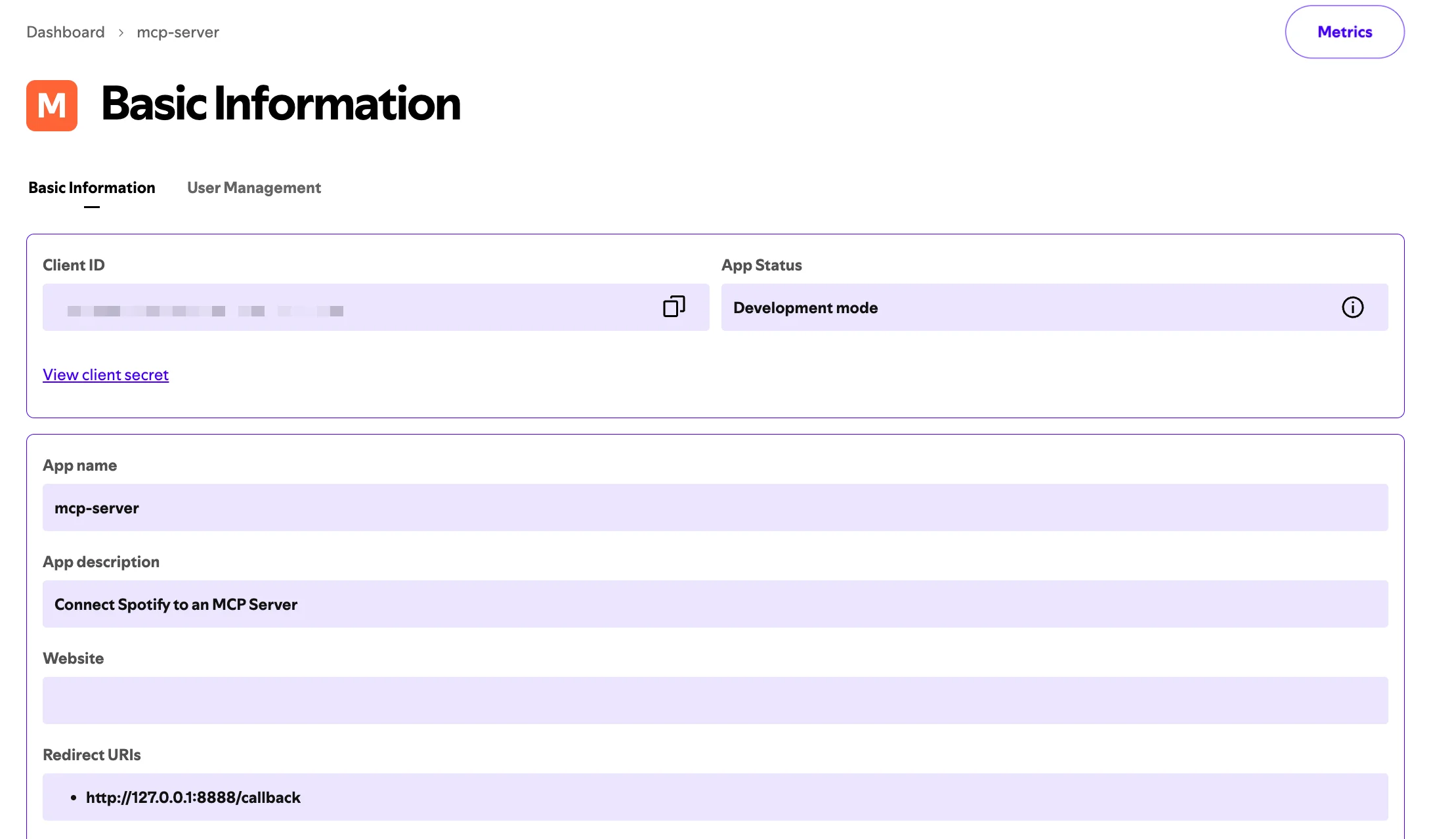 Spotify Developer Dashboard
After creating the app, you'll see your Client ID on the app's dashboard. Copy this value, you'll need it to configure your server. Note that you don't need a Client Secret for PKCE authentication.
Project Setup
TypeScript:
npm init -y
npm install @modelcontextprotocol/sdk @spotify/web-api-ts-sdk open
npm install -D typescript @types/node
Configure TypeScript with a tsconfig.json that includes "type": "module" in your package.json.
Python:
pip install mcp spotipy
Create a basic package structure:
src/
  spotify_mcp/
    __init__.py
    auth.py
    oauth_server.py
    server.py
Understanding PKCE Authentication
PKCE authentication adds security to OAuth flows by using dynamically generated codes. Traditional OAuth flows require a client secret, but PKCE uses a code verifier and challenge instead. This makes it suitable for applications that can't securely store secrets.
The PKCE flow works in these steps:
- Generate a random code verifier
- Create a code challenge by hashing the verifier
- Request authorization with the challenge
- Exchange the authorization code and verifier for tokens
Security Considerations
Several security measures protect this implementation:
The state parameter prevents CSRF attacks by verifying the authorization response matches the request. PKCE eliminates the need to store client secrets by using dynamic code verification. Token caching reduces authentication frequency, minimizing exposure to potential attacks. The callback server only accepts connections from localhost, preventing external access.
Always validate the state parameter matches before accepting authorization codes. Store tokens in a secure location with appropriate file permissions. Never log or expose access tokens or refresh tokens. Limit the requested scopes to only what your application needs.
Building the OAuth Callback Server
The OAuth callback server handles the redirect from Spotify after user authorization. This server creates a simple HTTP endpoint that listens on localhost port 8888.
When Spotify redirects the user back after authentication, it includes an authorization code in the URL parameters. The callback server extracts this code, validates the state parameter for security, and displays a success or error message to the user.
TypeScript (src/oauth-server.ts):
import http from 'http';
import { URL } from 'url';

export interface OAuthCallbackResult {
  code: string;
  state: string;
}

export function startOAuthCallbackServer(
  port: number = 8888
): Promise<OAuthCallbackResult> {
  return new Promise((resolve, reject) => {
    const server = http.createServer((req, res) => {
      const url = new URL(req.url || '', `http://127.0.0.1:${port}`);

      if (url.pathname === '/callback') {
        const code = url.searchParams.get('code');
        const state = url.searchParams.get('state');
        const error = url.searchParams.get('error');

        if (error) {
          res.writeHead(400, { 'Content-Type': 'text/html' });
          res.end(`
            <html>
              <body>
                <h1>Authentication Failed</h1>
                <p>Error: ${error}</p>
                <p>You can close this window.</p>
              </body>
            </html>
          `);
          server.close();
          reject(new Error(`OAuth error: ${error}`));
          return;
        }

        if (!code || !state) {
          res.writeHead(400, { 'Content-Type': 'text/html' });
          res.end(`
            <html>
              <body>
                <h1>Authentication Failed</h1>
                <p>Missing code or state parameter.</p>
                <p>You can close this window.</p>
              </body>
            </html>
          `);
          server.close();
          reject(new Error('Missing code or state parameter'));
          return;
        }

        res.writeHead(200, { 'Content-Type': 'text/html' });
        res.end(`
          <html>
            <body>
              <h1>Authentication Successful!</h1>
              <p>You have successfully authenticated with Spotify.</p>
              <p>You can close this window and return to Claude Desktop.</p>
              <script>window.close();</script>
            </body>
          </html>
        `);

        server.close();
        resolve({ code, state });
      }
    });

    server.listen(port, '127.0.0.1', () => {
      console.error(`OAuth callback server listening on http://127.0.0.1:${port}/callback`);
    });

    server.on('error', (err) => {
      reject(err);
    });
  });
}
The Python implementation uses the built-in http.server module to create a similar callback handler. It defines a custom request handler class that processes the OAuth callback and stores the result in a class variable.
Python (src/spotify_mcp/oauth_server.py):
import http.server
import socketserver
from typing import Optional
from urllib.parse import urlparse, parse_qs

class OAuthCallbackResult:
    """Result from OAuth callback."""

    def __init__(self, code: str, state: str):
        self.code = code
        self.state = state

class OAuthCallbackHandler(http.server.BaseHTTPRequestHandler):
    """HTTP request handler for OAuth callback."""

    result: Optional[OAuthCallbackResult] = None
    error: Optional[str] = None

    def log_message(self, format, *args):
        """Suppress default logging."""
        pass

    def do_GET(self):
        """Handle GET request to callback endpoint."""
        parsed_url = urlparse(self.path)

        if parsed_url.path == '/callback':
            query_params = parse_qs(parsed_url.query)

            error = query_params.get('error', [None])[0]
            if error:
                self.send_response(400)
                self.send_header('Content-Type', 'text/html')
                self.end_headers()
                self.wfile.write(f"""
                    <html>
                        <body>
                            <h1>Authentication Failed</h1>
                            <p>Error: {error}</p>
                            <p>You can close this window.</p>
                        </body>
                    </html>
                """.encode())
                OAuthCallbackHandler.error = error
                return

            code = query_params.get('code', [None])[0]
            state = query_params.get('state', [None])[0]

            if not code or not state:
                self.send_response(400)
                self.send_header('Content-Type', 'text/html')
                self.end_headers()
                self.wfile.write(b"""
                    <html>
                        <body>
                            <h1>Authentication Failed</h1>
                            <p>Missing code or state parameter.</p>
                            <p>You can close this window.</p>
                        </body>
                    </html>
                """)
                OAuthCallbackHandler.error = "Missing code or state"
                return

            self.send_response(200)
            self.send_header('Content-Type', 'text/html')
            self.end_headers()
            self.wfile.write(b"""
                <html>
                    <body>
                        <h1>Authentication Successful!</h1>
                        <p>You have successfully authenticated with Spotify.</p>
                        <p>You can close this window and return to Claude Desktop.</p>
                        <script>window.close();</script>
                    </body>
                </html>
            """)

            OAuthCallbackHandler.result = OAuthCallbackResult(code, state)

def start_oauth_callback_server(port: int = 8888) -> OAuthCallbackResult:
    """
    Start OAuth callback server and wait for callback.

    Args:
        port: Port to listen on (default: 8888)

    Returns:
        OAuthCallbackResult with code and state

    Raises:
        Exception: If OAuth callback fails
    """
    OAuthCallbackHandler.result = None
    OAuthCallbackHandler.error = None

    with socketserver.TCPServer(("127.0.0.1", port), OAuthCallbackHandler) as httpd:
        print(f"OAuth callback server listening on http://127.0.0.1:{port}/callback",
              flush=True)

        # Handle requests until we get a result or error
        while OAuthCallbackHandler.result is None and OAuthCallbackHandler.error is None:
            httpd.handle_request()

        if OAuthCallbackHandler.error:
            raise Exception(f"OAuth error: {OAuthCallbackHandler.error}")

        if OAuthCallbackHandler.result is None:
            raise Exception("OAuth callback failed")

        return OAuthCallbackHandler.result
Both implementations listen for the OAuth callback, extract the authorization code and state parameter, display a success message to the user, and then close the server. The promise (TypeScript) or function return (Python) resolves with the code needed for token exchange.
Creating the Authentication Module
The authentication module handles the complete PKCE flow, token management, and caching.
Generating PKCE Credentials
These helper methods create the cryptographic values needed for PKCE. The code verifier is a random 32-byte string that serves as a secret only your application knows. The code challenge is derived from this verifier using SHA-256 hashing, which you'll send to Spotify during authorization. When exchanging the authorization code for tokens, you'll prove you're the same application by providing the original verifier.
Start by generating the code verifier and challenge:
TypeScript:
private generateCodeVerifier(): string {
  return crypto.randomBytes(32).toString('base64url');
}

private async generateCodeChallenge(verifier: string): Promise<string> {
  const hash = crypto.createHash('sha256').update(verifier).digest();
  return hash.toString('base64url');
}
Python:
def _generate_code_verifier(self) -> str:
    """Generate PKCE code verifier."""
    code_verifier = base64.urlsafe_b64encode(secrets.token_bytes(32))
    return code_verifier.decode('utf-8').rstrip('=')

def _generate_code_challenge(self, verifier: str) -> str:
    """Generate PKCE code challenge from verifier."""
    digest = hashlib.sha256(verifier.encode('utf-8')).digest()
    code_challenge = base64.urlsafe_b64encode(digest)
    return code_challenge.decode('utf-8').rstrip('=')
The code verifier is a random 32-byte string encoded in base64url. The challenge is the SHA-256 hash of this verifier, also in base64url format.
Implementing Token Caching
The token cache system reads and writes JSON files to persist authentication tokens between sessions. When loading cached tokens, the code checks if they're still valid by comparing the expiration timestamp (with a 5-minute buffer to account for network latency). If the access token is expired but a refresh token exists, the cache is returned so the token can be refreshed. This prevents users from having to re-authenticate every time they use the server.
Store tokens in the user's home directory:
TypeScript:
private async loadTokenCache(): Promise<TokenCache | null> {
  try {
    const data = await fs.readFile(this.tokenCachePath, 'utf-8');
    const cache: TokenCache = JSON.parse(data);

    // Check if token is still valid (with 5 minute buffer)
    if (cache.expires_at && cache.expires_at > Date.now() + 5 * 60 * 1000) {
      return cache;
    }

    // If we have a refresh token, return the cache so we can refresh
    if (cache.refresh_token) {
      return cache;
    }

    return null;
  } catch (error) {
    return null;
  }
}

private async saveTokenCache(tokens: any): Promise<void> {
  try {
    const cacheDir = path.dirname(this.tokenCachePath);
    await fs.mkdir(cacheDir, { recursive: true });

    const cache: TokenCache = {
      access_token: tokens.access_token,
      token_type: tokens.token_type,
      expires_in: tokens.expires_in,
      refresh_token: tokens.refresh_token,
      scope: tokens.scope,
      expires_at: Date.now() + (tokens.expires_in * 1000),
    };

    await fs.writeFile(this.tokenCachePath, JSON.stringify(cache, null, 2));
  } catch (error) {
    console.error('Failed to save token cache:', error);
  }
}
Python:
def _load_token_cache(self) -> Optional[dict]:
    """Load cached tokens from disk."""
    try:
        if self.token_cache_path.exists():
            with open(self.token_cache_path, 'r') as f:
                cache = json.load(f)

            # Check if token is still valid (with 5 minute buffer)
            if cache.get('expires_at', 0) > time.time() + 300:
                return cache

            # If we have a refresh token, return cache so we can refresh
            if cache.get('refresh_token'):
                return cache

        return None
    except Exception:
        return None

def _save_token_cache(self, token_info: dict) -> None:
    """Save tokens to disk cache."""
    try:
        self.cache_dir.mkdir(parents=True, exist_ok=True)

        cache = {
            'access_token': token_info['access_token'],
            'token_type': token_info['token_type'],
            'expires_in': token_info['expires_in'],
            'refresh_token': token_info.get('refresh_token', ''),
            'scope': token_info['scope'],
            'expires_at': int(time.time()) + token_info['expires_in'],
        }

        with open(self.token_cache_path, 'w') as f:
            json.dump(cache, f, indent=2)

    except Exception as e:
        print(f"Failed to save token cache: {e}", flush=True)
The cache includes an expiration timestamp calculated from the expires_in value. A 5-minute buffer ensures tokens are refreshed before they expire.
Refreshing Access Tokens
Token refresh is a critical part of maintaining long-term authentication. This method makes a POST request to Spotify's token endpoint with the refresh token and your client ID.
Spotify validates these credentials and issues a new access token (and sometimes a new refresh token). This happens transparently to the user, they don't need to re-authorize unless the refresh token itself has been revoked or expired.
TypeScript:
private async refreshAccessToken(refreshToken: string): Promise<any> {
  const tokenUrl = 'https://accounts.spotify.com/api/token';

  const params = new URLSearchParams({
    grant_type: 'refresh_token',
    refresh_token: refreshToken,
    client_id: this.config.clientId,
  });

  const response = await fetch(tokenUrl, {
    method: 'POST',
    headers: {
      'Content-Type': 'application/x-www-form-urlencoded',
    },
    body: params.toString(),
  });

  if (!response.ok) {
    throw new Error(`Failed to refresh token: ${response.statusText}`);
  }

  return await response.json();
}
Python:
# Token refresh using SpotifyOAuth from spotipy
if cached_tokens['expires_at'] <= time.time() + 300:
    print("Access token expired, refreshing...", flush=True)
    try:
        auth_manager = SpotifyOAuth(
            client_id=self.client_id,
            redirect_uri=self.redirect_uri,
            scope=' '.join(self.scopes),
            open_browser=False,
        )

        new_tokens = auth_manager.refresh_access_token(
            cached_tokens['refresh_token']
        )

        # Keep the refresh token if not provided in response
        if 'refresh_token' not in new_tokens:
            new_tokens['refresh_token'] = cached_tokens['refresh_token']

        self._save_token_cache(new_tokens)
        self._spotify_client = spotipy.Spotify(
            auth=new_tokens['access_token']
        )
        return self._spotify_client
    except Exception as e:
        print(f"Failed to refresh token, starting new auth flow: {e}",
              flush=True)
The Complete Authentication Flow
The main authenticate method orchestrates the entire process.
The method first checks for an existing authentication client to avoid redundant auth flows. It then attempts to load cached tokens and refresh them if needed. If no valid cached tokens exist, it initiates the full PKCE flow by generating credentials, constructing the authorization URL with all required parameters, opening the user's browser, and waiting for the callback.
Once the callback completes with a valid authorization code, it exchanges that code (along with the code verifier) for access tokens and caches them for future use.
TypeScript:
async authenticate(): Promise<SpotifyApi> {
  if (this.spotifyApi) {
    return this.spotifyApi;
  }

  // Try to load cached tokens
  const cachedTokens = await this.loadTokenCache();

  if (cachedTokens) {
    // Check if token needs refresh
    if (cachedTokens.expires_at <= Date.now() + 5 * 60 * 1000) {
      console.error('Access token expired, refreshing...');
      try {
        const newTokens = await this.refreshAccessToken(cachedTokens.refresh_token);
        if (!newTokens.refresh_token) {
          newTokens.refresh_token = cachedTokens.refresh_token;
        }
        await this.saveTokenCache(newTokens);

        this.spotifyApi = SpotifyApi.withAccessToken(this.config.clientId, newTokens);
        return this.spotifyApi;
      } catch (error) {
        console.error('Failed to refresh token, starting new auth flow:', error);
      }
    } else {
      console.error('Using cached access token');
      this.spotifyApi = SpotifyApi.withAccessToken(this.config.clientId, cachedTokens);
      return this.spotifyApi;
    }
  }

  // Start full PKCE auth flow
  const codeVerifier = this.generateCodeVerifier();
  const codeChallenge = await this.generateCodeChallenge(codeVerifier);
  const state = crypto.randomBytes(16).toString('hex');

  const authUrl = new URL('https://accounts.spotify.com/authorize');
  authUrl.searchParams.append('client_id', this.config.clientId);
  authUrl.searchParams.append('response_type', 'code');
  authUrl.searchParams.append('redirect_uri', this.config.redirectUri);
  authUrl.searchParams.append('code_challenge_method', 'S256');
  authUrl.searchParams.append('code_challenge', codeChallenge);
  authUrl.searchParams.append('state', state);
  authUrl.searchParams.append('scope', this.config.scopes.join(' '));

  const callbackPromise = startOAuthCallbackServer(8888);
  await open(authUrl.toString());

  const { code, state: returnedState } = await callbackPromise;

  if (state !== returnedState) {
    throw new Error('State mismatch - possible CSRF attack');
  }

  // Exchange code for tokens
  const tokenUrl = 'https://accounts.spotify.com/api/token';
  const params = new URLSearchParams({
    grant_type: 'authorization_code',
    code,
    redirect_uri: this.config.redirectUri,
    client_id: this.config.clientId,
    code_verifier: codeVerifier,
  });

  const response = await fetch(tokenUrl, {
    method: 'POST',
    headers: {
      'Content-Type': 'application/x-www-form-urlencoded',
    },
    body: params.toString(),
  });

  if (!response.ok) {
    const errorText = await response.text();
    throw new Error(`Failed to exchange code for tokens: ${response.statusText} - ${errorText}`);
  }

  const tokens = await response.json();
  await this.saveTokenCache(tokens);

  this.spotifyApi = SpotifyApi.withAccessToken(this.config.clientId, tokens);
  return this.spotifyApi;
}
Python:
def authenticate(self) -> spotipy.Spotify:
    """
    Authenticate with Spotify using PKCE flow.

    Returns:
        Authenticated Spotipy client

    Raises:
        Exception: If authentication fails
    """
    if self._spotify_client:
        return self._spotify_client

    # Try to load cached tokens
    cached_tokens = self._load_token_cache()

    if cached_tokens:
        # Check if token needs refresh
        if cached_tokens['expires_at'] <= time.time() + 300:
            print("Access token expired, refreshing...", flush=True)
            try:
                auth_manager = SpotifyOAuth(
                    client_id=self.client_id,
                    redirect_uri=self.redirect_uri,
                    scope=' '.join(self.scopes),
                    open_browser=False,
                )

                new_tokens = auth_manager.refresh_access_token(
                    cached_tokens['refresh_token']
                )

                if 'refresh_token' not in new_tokens:
                    new_tokens['refresh_token'] = cached_tokens['refresh_token']

                self._save_token_cache(new_tokens)
                self._spotify_client = spotipy.Spotify(
                    auth=new_tokens['access_token']
                )
                return self._spotify_client

            except Exception as e:
                print(f"Failed to refresh token, starting new auth flow: {e}",
                      flush=True)
        else:
            print("Using cached access token", flush=True)
            self._spotify_client = spotipy.Spotify(
                auth=cached_tokens['access_token']
            )
            return self._spotify_client

    # Start full PKCE auth flow
    print("Starting Spotify authentication...", flush=True)

    code_verifier = self._generate_code_verifier()
    code_challenge = self._generate_code_challenge(code_verifier)
    state = secrets.token_hex(16)

    auth_params = {
        'client_id': self.client_id,
        'response_type': 'code',
        'redirect_uri': self.redirect_uri,
        'code_challenge_method': 'S256',
        'code_challenge': code_challenge,
        'state': state,
        'scope': ' '.join(self.scopes),
    }

    auth_url = f"https://accounts.spotify.com/authorize?{urlencode(auth_params)}"

    print("Opening browser for authentication...", flush=True)
    print(f"If the browser doesn't open, visit: {auth_url}", flush=True)

    webbrowser.open(auth_url)
    callback_result = start_oauth_callback_server(8888)

    if state != callback_result.state:
        raise Exception("State mismatch - possible CSRF attack")

    # Exchange code for tokens using SpotifyOAuth
    auth_manager = SpotifyOAuth(
        client_id=self.client_id,
        redirect_uri=self.redirect_uri,
        scope=' '.join(self.scopes),
        open_browser=False,
    )

    token_info = auth_manager._request_access_token(
        callback_result.code,
        code_verifier
    )

    self._save_token_cache(token_info)

    print("Authentication successful!", flush=True)
    self._spotify_client = spotipy.Spotify(auth=token_info['access_token'])
    return self._spotify_client
Both implementations first check for cached tokens and refresh them if needed. If no valid cache exists, they initiate the full PKCE flow by generating credentials, opening the browser for authorization, waiting for the callback, and exchanging the code for tokens.
Understanding the Authorization URL
When the server starts the OAuth flow, it constructs an authorization URL with several important parameters. Here's what a complete authorization URL looks like:
https://accounts.spotify.com/authorize?
  client_id=7fbde02f81c24c53b459988df4f72b65&
  response_type=code&
  redirect_uri=http%3A%2F%2F127.0.0.1%3A8888%2Fcallback&
  code_challenge_method=S256&
  code_challenge=ES0JDMAAI4njrsO_DxPHWfneROktJByLDH0j9OEWTd8&
  state=7e126af5a684e943a10fc42d1d3e758f&
  scope=user-read-private+user-read-email+user-library-read+...
Each parameter serves a specific purpose:
- client_id: Your application's unique identifier from the Spotify Developer Dashboard. This tells Spotify which app is requesting access.
- response_type: Set to
codefor the authorization code flow. Spotify will return an authorization code that you'll exchange for tokens. - redirect_uri: Where Spotify redirects after authentication. Must exactly match one of the URIs registered in your app settings. URL-encoded as
http%3A%2F%2F127.0.0.1%3A8888%2Fcallback. - code_challenge_method: Set to
S256for SHA-256 hashing. This tells Spotify how the code challenge was generated. - code_challenge: The SHA-256 hash of your code verifier, base64url-encoded. This is the PKCE challenge that proves your app's identity during token exchange.
- state: A random value used to prevent CSRF attacks. Your server verifies this matches when Spotify redirects back.
- scope: Space-separated list of permissions your app needs. These determine what data and actions your MCP server can access.
The User Authorization Experience
When authentication begins, the user sees Spotify's authorization page requesting permission to connect. The page displays your app name and lists the specific permissions being requested.
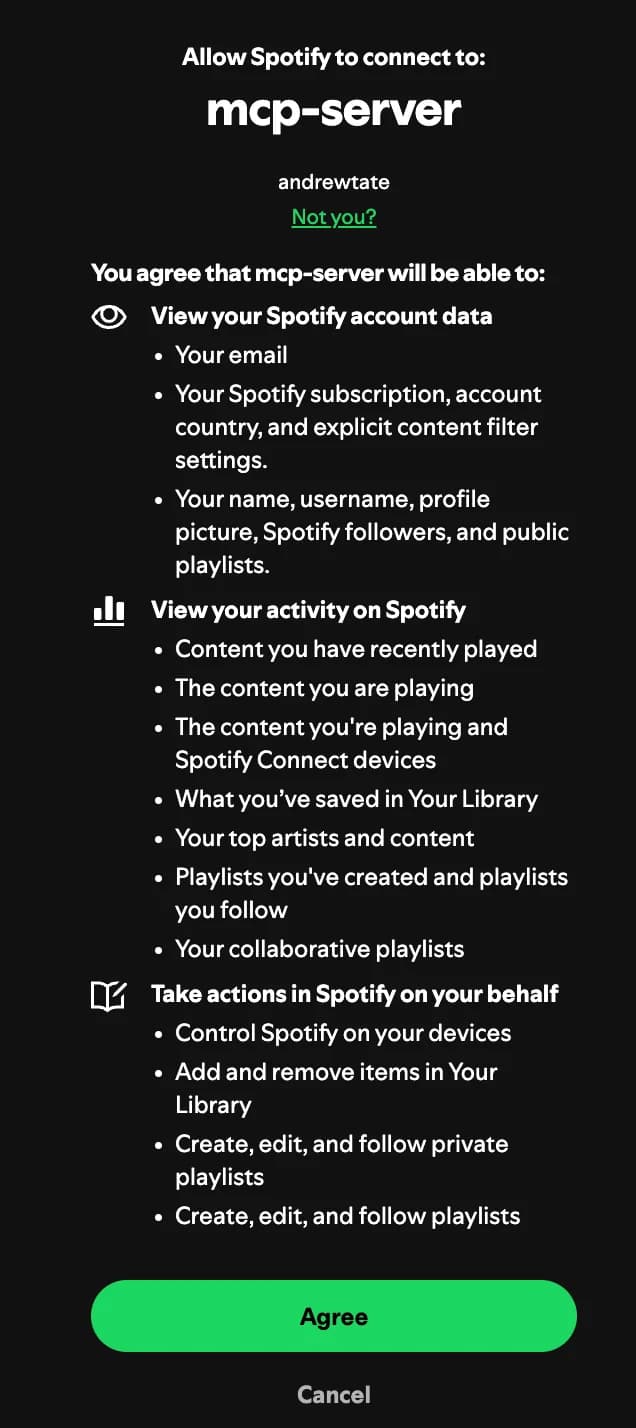 Spotify Authorization Page
The permissions are organized into three categories:
- Under "View your Spotify account data," users see requests for email, subscription details, and profile information.
- The "View your activity on Spotify" section includes recently played tracks, current playback, saved library items, top artists and content, and playlists.
- Finally, "Take actions in Spotify on your behalf" covers playback control, library modifications, and playlist management.
After the user clicks "Agree," Spotify redirects to your callback server with the authorization code. Your server exchanges this code along with the code verifier for access and refresh tokens.
Setting Up the MCP Server
The main server file creates the MCP server and registers tools.
Initializing the Server
The server initialization sets up your Spotify client ID from environment variables and defines the OAuth scopes your application needs. These scopes determine what data and actions your server can access on behalf of the user. The scopes include reading user profile data, accessing library content, managing playlists, viewing listening history, and controlling playback.
Each scope must be explicitly requested and approved by the user during authorization.
TypeScript (src/index.ts):
const SPOTIFY_CLIENT_ID = process.env.SPOTIFY_CLIENT_ID;

if (!SPOTIFY_CLIENT_ID) {
  console.error('Error: SPOTIFY_CLIENT_ID environment variable is required');
  process.exit(1);
}

const SCOPES = [
  'user-read-private',
  'user-read-email',
  'user-library-read',
  'user-library-modify',
  'playlist-read-private',
  'playlist-read-collaborative',
  'playlist-modify-public',
  'playlist-modify-private',
  'user-top-read',
  'user-read-recently-played',
  'user-read-playback-state',
  'user-modify-playback-state',
  'user-read-currently-playing',
];

const spotifyAuth = new SpotifyAuth({
  clientId: SPOTIFY_CLIENT_ID,
  redirectUri: 'http://127.0.0.1:8888/callback',
  scopes: SCOPES,
});

const server = new Server(
  {
    name: 'spotify-mcp-server',
    version: '1.0.0',
  },
  {
    capabilities: {
      tools: {},
    },
  }
);
Python (src/spotify_mcp/server.py):
SPOTIFY_CLIENT_ID = os.getenv("SPOTIFY_CLIENT_ID")

if not SPOTIFY_CLIENT_ID:
    print("Error: SPOTIFY_CLIENT_ID environment variable is required", file=sys.stderr)
    sys.exit(1)

SCOPES = [
    "user-read-private",
    "user-read-email",
    "user-library-read",
    "user-library-modify",
    "playlist-read-private",
    "playlist-read-collaborative",
    "playlist-modify-public",
    "playlist-modify-private",
    "user-top-read",
    "user-read-recently-played",
    "user-read-playback-state",
    "user-modify-playback-state",
    "user-read-currently-playing",
]

spotify_auth = SpotifyAuth(
    client_id=SPOTIFY_CLIENT_ID,
    redirect_uri="http://127.0.0.1:8888/callback",
    scopes=SCOPES,
)

server = Server("spotify-mcp-server")
Registering Tools
Tool registration tells the MCP framework what capabilities your server provides. Each tool definition includes a name, description, and input schema that describes the parameters it accepts. The input schema uses JSON Schema format to specify parameter types, descriptions, and whether they're required.
When Claude or another AI assistant receives the list of available tools, it uses these definitions to understand what each tool does and how to call it correctly.
TypeScript:
server.setRequestHandler(ListToolsRequestSchema, async () => {
  return {
    tools: [
      {
        name: 'search_tracks',
        description: 'Search for tracks on Spotify',
        inputSchema: {
          type: 'object',
          properties: {
            query: {
              type: 'string',
              description: 'Search query for tracks',
            },
            limit: {
              type: 'number',
              description: 'Maximum number of results to return (default: 10)',
              default: 10,
            },
          },
          required: ['query'],
        },
      },
      {
        name: 'get_user_playlists',
        description: 'Get the current user\'s playlists',
        inputSchema: {
          type: 'object',
          properties: {
            limit: {
              type: 'number',
              description: 'Maximum number of results to return (default: 20)',
              default: 20,
            },
          },
        },
      },
      // Additional tools...
    ],
  };
});
Python:
@server.list_tools()
async def handle_list_tools() -> list[types.Tool]:
    """List available Spotify tools."""
    return [
        types.Tool(
            name="search_tracks",
            description="Search for tracks on Spotify",
            inputSchema={
                "type": "object",
                "properties": {
                    "query": {
                        "type": "string",
                        "description": "Search query for tracks",
                    },
                    "limit": {
                        "type": "number",
                        "description": "Maximum number of results to return (default: 10)",
                        "default": 10,
                    },
                },
                "required": ["query"],
            },
        ),
        types.Tool(
            name="get_user_playlists",
            description="Get the current user's playlists",
            inputSchema={
                "type": "object",
                "properties": {
                    "limit": {
                        "type": "number",
                        "description": "Maximum number of results to return (default: 20)",
                        "default": 20,
                    },
                },
            },
        ),
        # Additional tools...
    ]
Handling Tool Calls
The tool call handler is where your server actually executes Spotify API requests. When a tool is called, the handler first authenticates with Spotify (using cached tokens or triggering a new auth flow if needed). It then uses a switch statement to route to the appropriate tool implementation based on the tool name.
Each case extracts the arguments, calls the relevant Spotify API endpoint, and formats the response as JSON.
TypeScript:
server.setRequestHandler(CallToolRequestSchema, async (request) => {
  const { name, arguments: args } = request.params;

  try {
    const api = await spotifyAuth.authenticate();

    switch (name) {
      case 'search_tracks': {
        const { query, limit = 10 } = args as { query: string; limit?: number };
        const results = await api.search(query, ['track'], undefined, Math.min(limit, 50) as any);

        return {
          content: [
            {
              type: 'text',
              text: JSON.stringify(results.tracks, null, 2),
            },
          ],
        };
      }

      case 'get_user_playlists': {
        const { limit = 20 } = args as { limit?: number };
        const playlists = await api.currentUser.playlists.playlists(Math.min(limit, 50) as any);

        return {
          content: [
            {
              type: 'text',
              text: JSON.stringify(playlists, null, 2),
            },
          ],
        };
      }

      default:
        throw new Error(`Unknown tool: ${name}`);
    }
  } catch (error) {
    return {
      content: [
        {
          type: 'text',
          text: `Error: ${error instanceof Error ? error.message : String(error)}`,
        },
      ],
      isError: true,
    };
  }
});
Python:
@server.call_tool()
async def handle_call_tool(
    name: str, arguments: dict[str, Any]
) -> list[types.TextContent | types.ImageContent | types.EmbeddedResource]:
    """Handle tool calls."""
    import json

    try:
        # Authenticate (will use cached token if available)
        client = spotify_auth.authenticate()

        if name == "search_tracks":
            query = arguments["query"]
            limit = min(arguments.get("limit", 10), 50)
            results = client.search(q=query, type="track", limit=limit)

            return [types.TextContent(type="text", text=json.dumps(results, indent=2))]

        elif name == "get_user_playlists":
            limit = min(arguments.get("limit", 20), 50)
            playlists = client.current_user_playlists(limit=limit)

            return [types.TextContent(type="text", text=json.dumps(playlists, indent=2))]

        else:
            raise ValueError(f"Unknown tool: {name}")

    except Exception as e:
        return [types.TextContent(type="text", text=f"Error: {str(e)}")]
Each tool call authenticates first, then executes the requested Spotify API operation. Results are returned as JSON strings.
Configuring Claude Desktop
To use your MCP server with Claude Desktop, you need to add it to the configuration file.
Locating the Configuration File
The configuration file location depends on your operating system:
- macOS:
~/Library/Application Support/Claude/claude_desktop_config.json - Windows:
%APPDATA%\Claude\claude_desktop_config.json - Linux:
~/.config/Claude/claude_desktop_config.json
Adding Your Server
Open the configuration file and add your Spotify MCP server to the mcpServers section:
For TypeScript:
{
  "mcpServers": {
    "spotify": {
      "command": "node",
      "args": ["/absolute/path/to/your/project/dist/index.js"],
      "env": {
        "SPOTIFY_CLIENT_ID": "your_client_id_here"
      }
    }
  }
}
For Python:
{
  "mcpServers": {
    "spotify": {
      "command": "python",
      "args": ["-m", "spotify_mcp.server"],
      "env": {
        "SPOTIFY_CLIENT_ID": "your_client_id_here"
      }
    }
  }
}
Replace the paths and your_client_id_here with your actual values. For TypeScript, use the absolute path to your compiled JavaScript file. For Python, ensure the package is installed or use the full module path.
First Run Authentication
After adding the configuration, restart Claude Desktop. The first time Claude tries to use a Spotify tool, your MCP server will initiate the authentication flow. Your default browser will open to the Spotify authorization page. After you click "Agree," Spotify redirects to your local callback server, which exchanges the authorization code for tokens and caches them.
Claude Desktop can now access your Spotify data through the MCP server tools.
Testing with Claude Desktop
Once configured in Claude Desktop, try these example queries:
"Can you get my playlists?" - Claude will use the get_user_playlists tool to retrieve your playlists. You'll see a list of your playlists with their names, track counts, and other details.
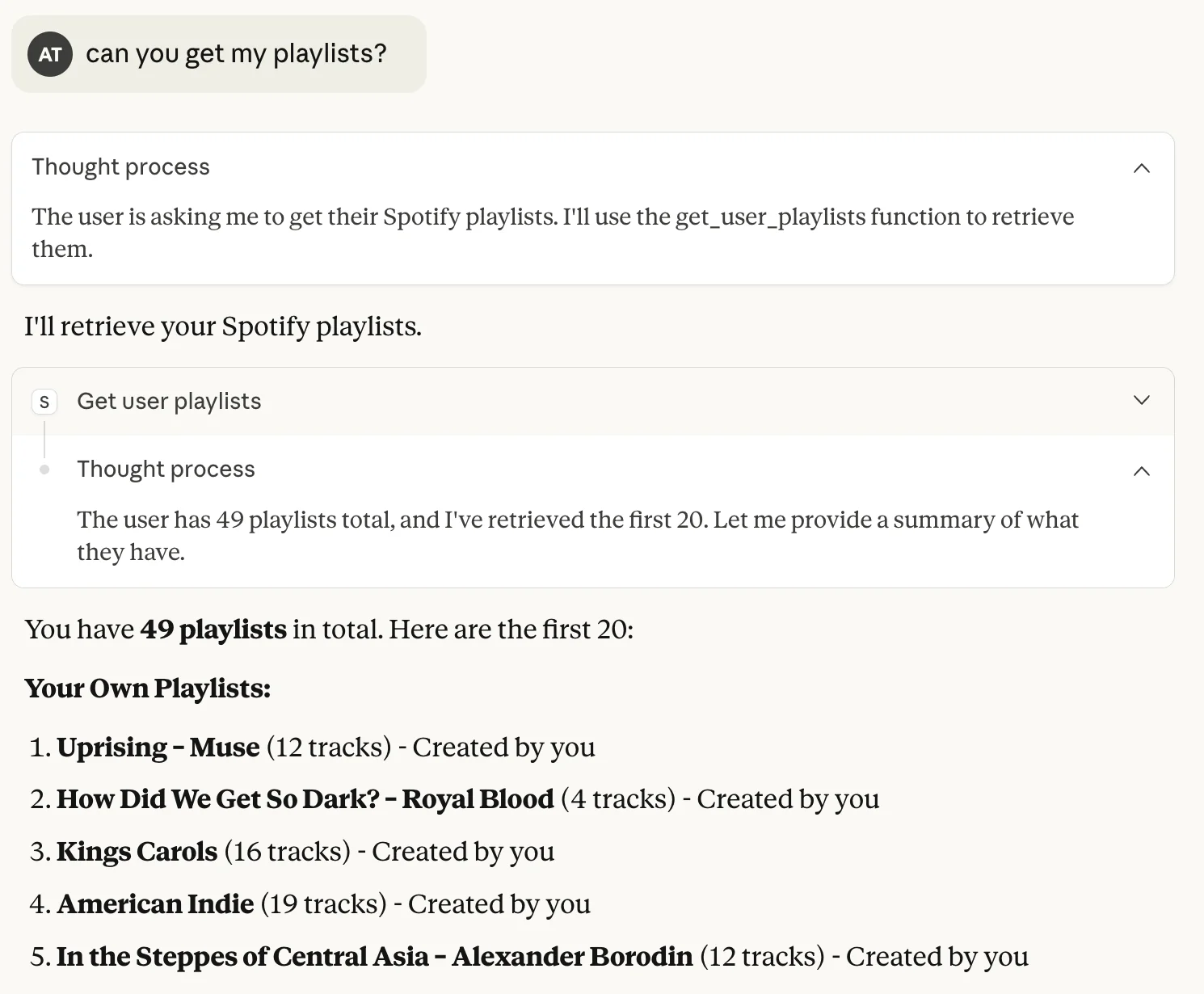 Spotify Playlists
"What are my top artists from the last few months?" - The get_user_top_artists tool returns your most-listened-to artists based on your listening history.
"Search for tracks by Radiohead" - The search_tracks tool queries Spotify and returns matching tracks with details like album, duration, and popularity.
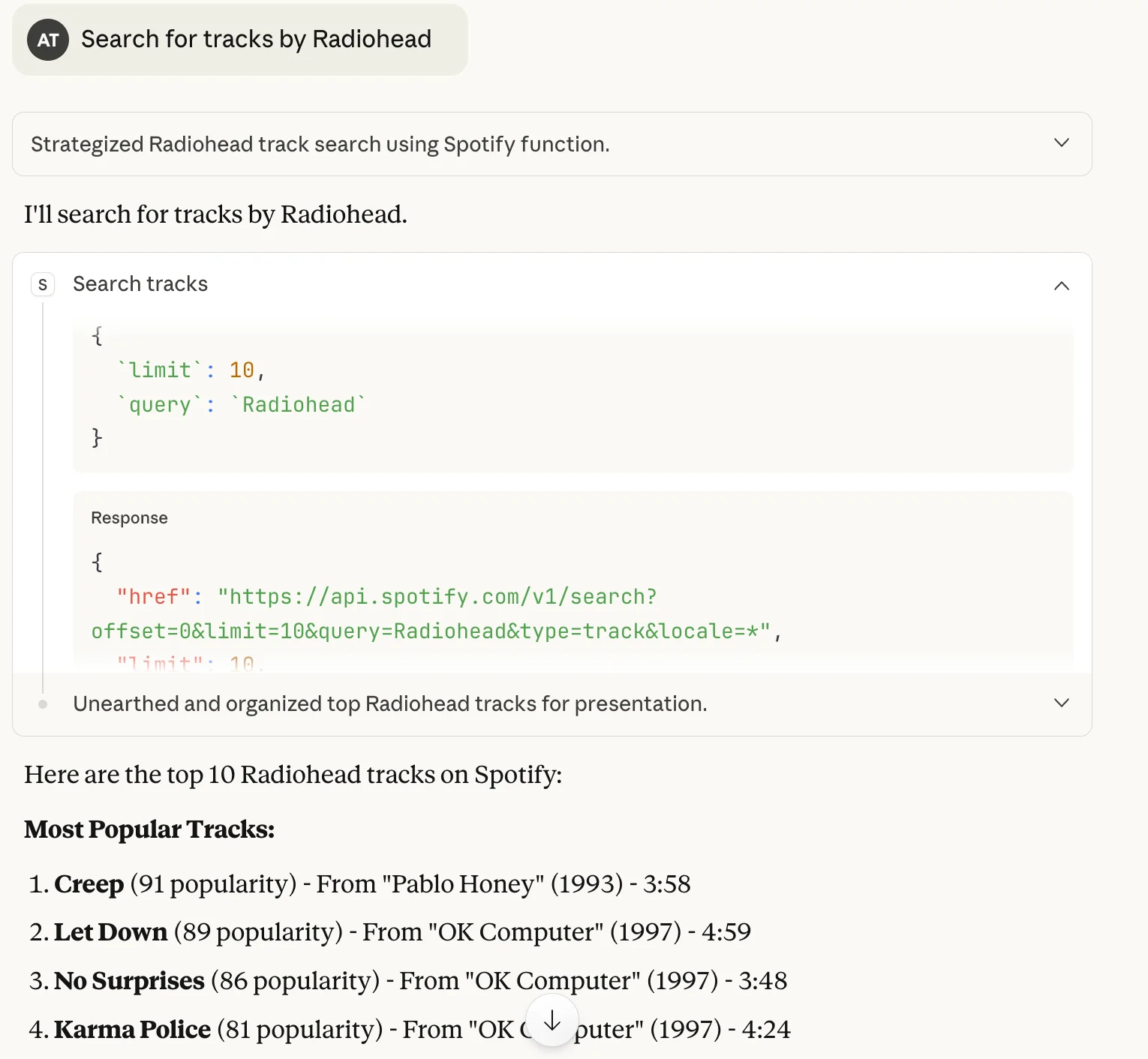 Spotify Search Tracks
You can also host your servers with Smithery. Simply add the GitHub repository containing your MCP server to Smithery, and then Smithery will build an image to deploy your server. All you need is:
- A Dockerfile that sets up the working environment
- A smithery.yaml file tells Smithery how to deploy your server
Once deployed, you can connect to Claude Desktop with a single command:
npx -y smithery@latest mcp add @[GITHUB]/[REPO] --client claude --key [YOUR-API-KEY]
Or connect to other clients, or create your own.
What You've Built and Where to Go Next
You've successfully created a production-ready MCP server with secure Spotify authentication using PKCE. Your server now handles the complete OAuth 2.0 flow, automatically manages token refresh, caches credentials for seamless re-authentication, and provides multiple tools for music discovery and user data access.
The foundation you've built opens up a ton of possibilities:
- Add more Spotify API endpoints like playlist creation and modification.
- Implement playback controls so Claude can be your DJ
- Add recommendation features based on listening history
- Create tools to analyze your music taste and generate insights about your listening patterns.
The authentication infrastructure handles all the heavy lifting, so you can focus entirely on building features that turn your Spotify data into something useful (or just entertainingly embarrassing).
Now go forth and let Claude help you understand why your music taste is simultaneously sophisticated and questionable.