

How to Build a Google Sheets MCP Server
The world runs on spreadsheets. Yes, users are in Postgres, docs are in Notion, and finance is in Stripe, but there will always be something, somewhere in a spreadsheet: a list of customer feedback, a budget forecast that changes hourly, a product roadmap that lives nowhere else, or that one critical piece of data that someone swears they’ll migrate “next quarter.”
And when that data is in a spreadsheet, it gets lost. No one knows where it is, and no one can quite query it to unlock its secrets.
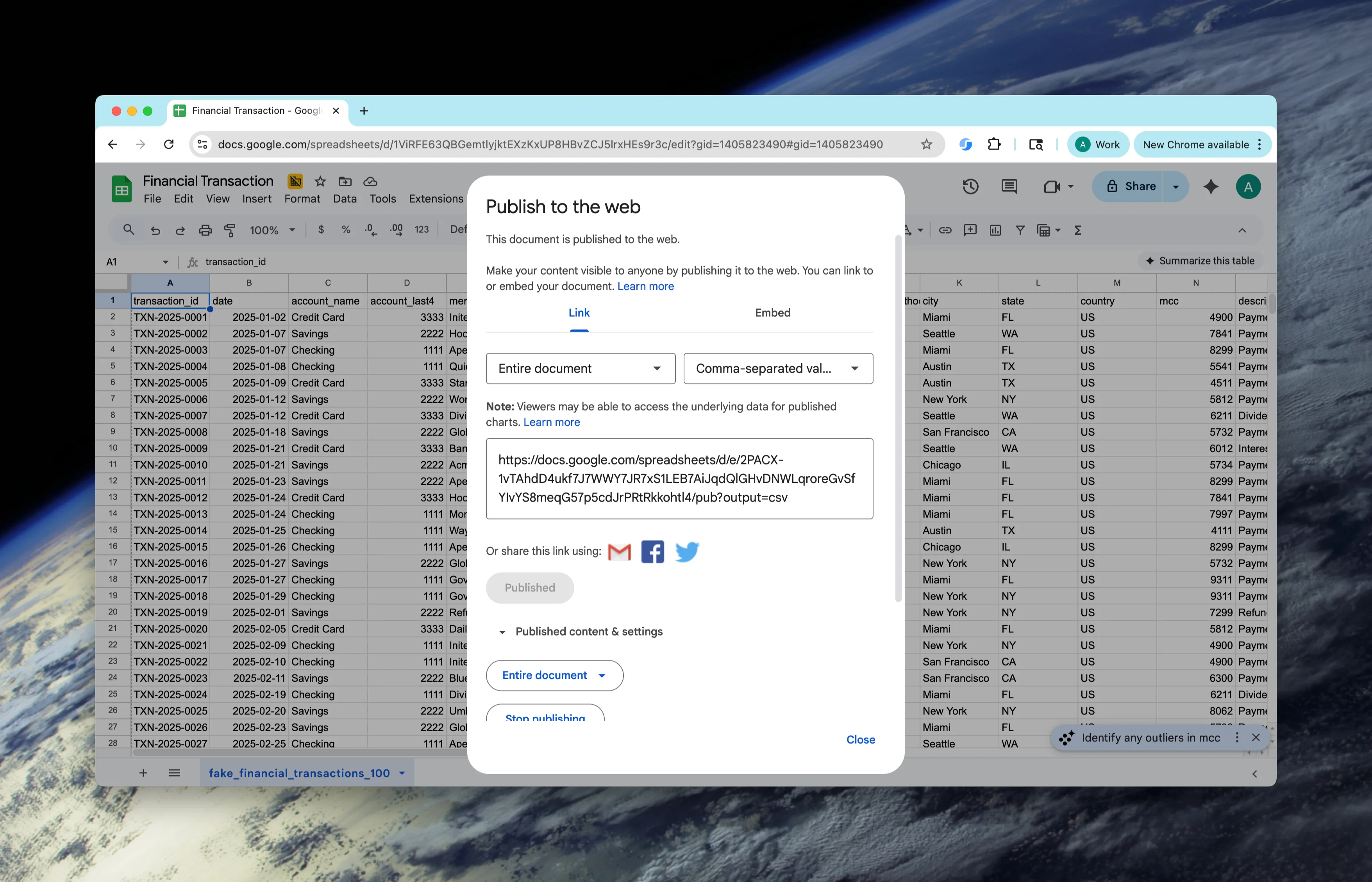
That is what we’re building here: an MCP server that can access a CSV-published Google Sheet and allows you to query this data. Once published, we’ll get a published URL:
 CleanShot 2025-08-19 at 15.33.35@2x.png
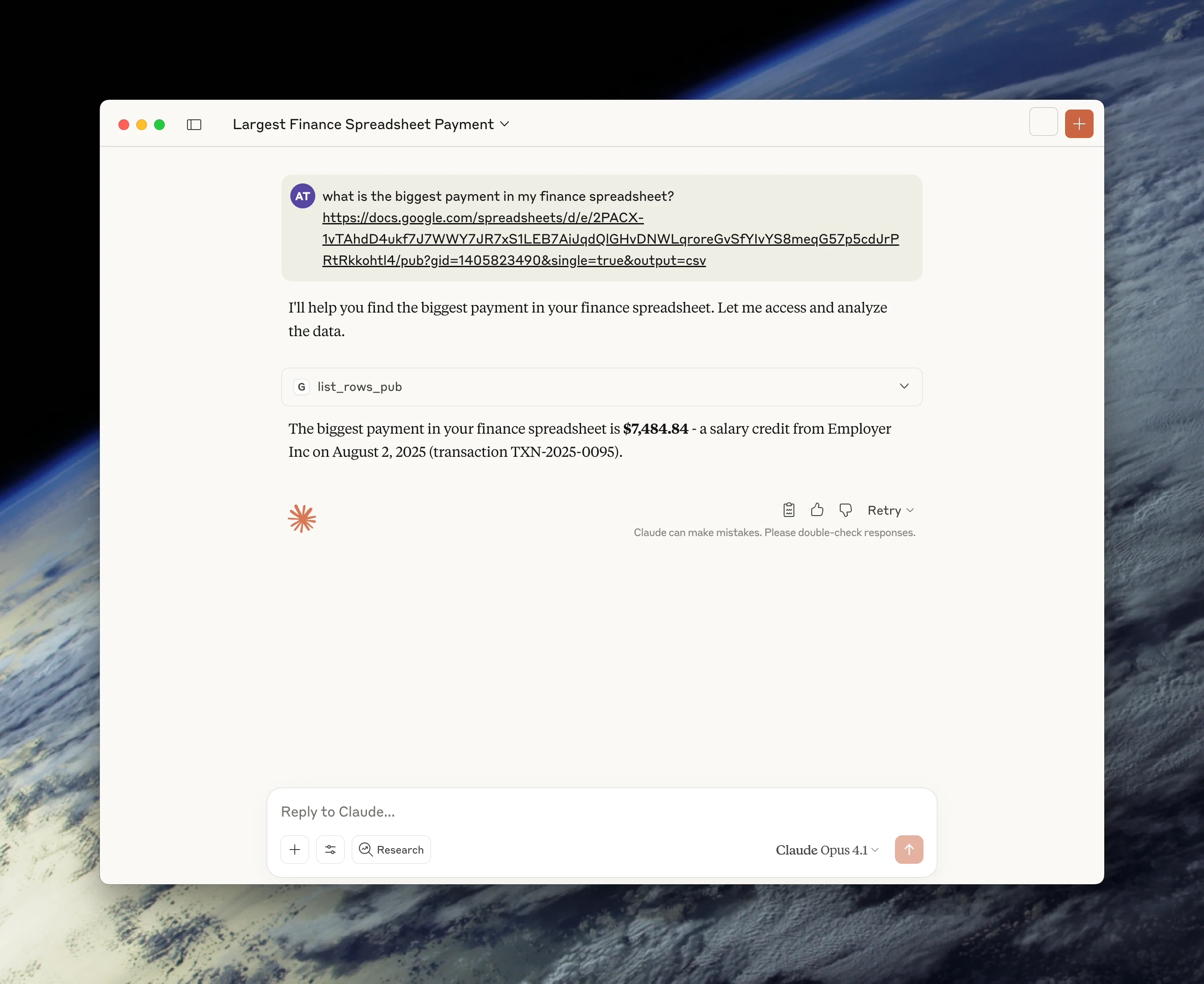
We’ll then use this to fetch our spreadsheet from the prompt and run queries against it, like this:
 CleanShot 2025-08-19 at 15.36.50@2x.png
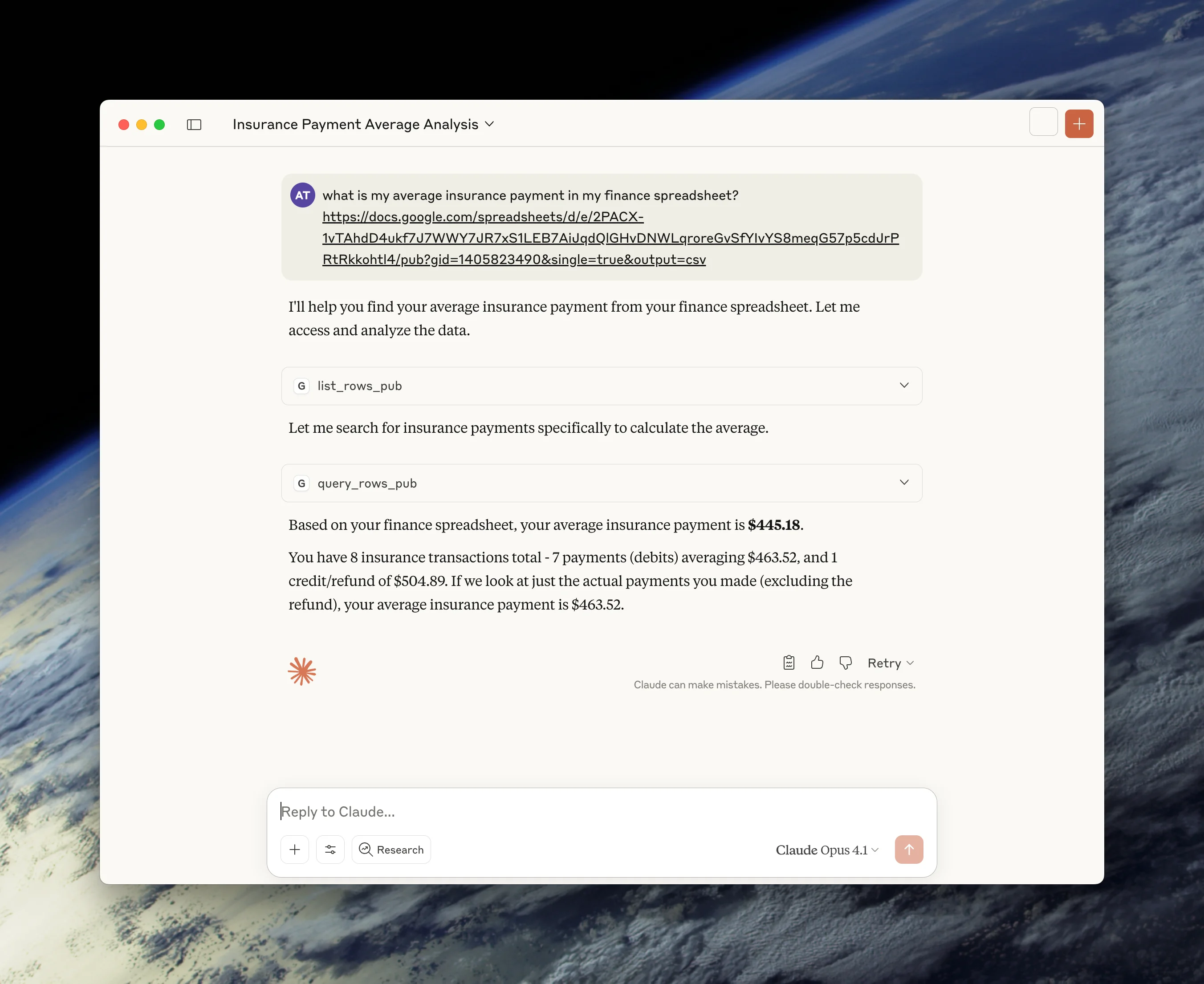
Or like this:
 CleanShot 2025-08-19 at 15.38.54@2x.png
Let’s get into the build. You can find the Python code here and the TypeScript code here.
Installing Our Dependencies
We will build our Google Sheets MCP Server in both TypeScript and Python.
TypeScript setup
For TypeScript, we’ll set up our project like this:
mkdir google-sheets-mcp
cd google-sheets-mcp
npm init y
npm install @modelcontextprotocol/sdk zod
npm install --save-dev typescript @types/node
npx tsc --init
We’ll be using:
@modelcontextprotocol/sdkfor implementing the MCP server protocol and handling client-server communicationzodfor schema validation and type-safe parsing of configuration and API responses
Our end goal for the setup is a package.json that looks like this:
{
  "name": "gsheets",
  "version": "1.0.0",
  "type": "module",
  "bin": {
    "gsheets": "./build/index.js"
  },
  "scripts": {
    "build": "tsc && chmod 755 build/index.js"
  },
  "files": ["build"],
  "dependencies": {
    "@modelcontextprotocol/sdk": "^1.0.0",
    "zod": "^3.23.8"
  },
  "devDependencies": {
    "@types/node": "^20.11.30",
    "typescript": "^5.6.3"
  }
}
And a tsconfig.json that looks like this:
{
  "compilerOptions": {
    "target": "ES2022",
    "module": "Node16",
    "moduleResolution": "Node16",
    "outDir": "./build",
    "rootDir": "./src",
    "strict": true,
    "esModuleInterop": true,
    "skipLibCheck": true,
    "forceConsistentCasingInFileNames": true
  },
  "include": ["src/**/*"],
  "exclude": ["node_modules"]
}
Python setup
Using uv for packages and environments, Python setup is simple. All we need to do is add FastMCP and httpx:
uv add "mcp[cli]" httpx
Setting Up Our Helpers
We can think about our MCP server as performing several sequential tasks:
- Fetching the spreadsheet - Making an HTTP request to Google Sheets’ public CSV endpoint using the provided spreadsheet and worksheet IDs
- Parsing the CSV - Converting the raw CSV text into structured data, handling headers, and transforming rows into objects
- Filtering, sorting, and selecting data - Applying operations to query specific rows, order results, and select only needed columns
- Outputting results - Formatting the processed data as JSON or a table and returning it to the MCP client
We need functions to perform each of these tasks. Let’s start with fetching our spreadsheet data.
//src/lib/http-utils.ts

/** HTTP fetch with timeout + follow redirects */
export async function fetchPublishedCsv(
  pubId: string,
  gid = "0"
): Promise<string> {
  // Construct the published CSV URL
  let url: string;
  if (gid !== "0") {
    url = `https://docs.google.com/spreadsheets/d/e/${pubId}/pub?gid=${gid}&single=true&output=csv`;
  } else {
    url = `https://docs.google.com/spreadsheets/d/e/${pubId}/pub?single=true&output=csv`;
  }

  const ac = new AbortController();
  const timer = setTimeout(() => ac.abort(), 30_000);
  try {
    const res = await fetch(url, { redirect: "follow", signal: ac.signal });
    if (!res.ok) throw new Error(`HTTP ${res.status}`);
    return await res.text();
  } finally {
    clearTimeout(timer);
  }
}

export function parseSpreadsheetUrl(url: string): {
  pubId: string;
  gid: string;
} {
  try {
    const urlObj = new URL(url);

    if (urlObj.hostname !== "docs.google.com") {
      throw new Error("URL must be from docs.google.com");
    }

    // Extract publication ID from published URL format
    const pubUrlMatch = urlObj.pathname.match(/\/spreadsheets\/d\/e\/([^\/]+)/);
    if (!pubUrlMatch) {
      throw new Error(
        'Invalid published Google Sheets URL format - must contain "/d/e/2PACX-..."'
      );
    }

    const pubId = pubUrlMatch[1];

    // Extract gid from URL parameters (default to '0' if not present)
    const gid = urlObj.searchParams.get("gid") || "0";

    return { pubId, gid };
  } catch (error) {
    throw new Error(
      `Failed to parse spreadsheet URL: ${
        error instanceof Error ? error.message : String(error)
      }`
    );
  }
}
# lib/http-utils.py

from __future__ import annotations
import httpx

async def fetch_published_csv(pub_id: str, gid: str = "0") -> str:
    """Fetch CSV data from a published Google Sheets document using a pub_id (2PACX...)."""
    if gid and gid != "0":
        url = f"https://docs.google.com/spreadsheets/d/e/{pub_id}/pub?gid={gid}&single=true&output=csv"
    else:
        url = f"https://docs.google.com/spreadsheets/d/e/{pub_id}/pub?single=true&output=csv"

    async with httpx.AsyncClient(timeout=30, follow_redirects=True) as client:
        r = await client.get(url)
        r.raise_for_status()
        return r.text

async def fetch_published_csv_from_url(sheets_url: str) -> str:
    """Fetch CSV data directly from a published Google Sheets CSV URL."""
    async with httpx.AsyncClient(timeout=30, follow_redirects=True) as client:
        r = await client.get(sheets_url)
        r.raise_for_status()
        return r.text
This constructs the publication URL using Google’s specific format, where the publication ID and worksheet GID are embedded in the path. We need to follow redirects explicitly since Google pushes you to a different URL when you select CSV.
Here, we’re returning raw CSV text, preserving the exact formatting from Google Sheets for accurate parsing downstream. From there, we can work with that CSV format:
//src/lib/csv-utils.ts

import { Row, Scalar, Filter, SortKey, FilterOp, Cmp } from "./types.js";

/** Normalize header cells into non-empty column names (col1, col2, ...) */
export function normalizeHeader(headerRow: readonly string[]): string[] {
  return headerRow.map((raw, i) => {
    const name = (raw ?? "").trim();
    return name || `col${i + 1}`;
  });
}

/** Simple type casting for JavaScript */
export function tryCast(v: unknown): Scalar {
  if (v === null || v === undefined) return null;
  if (typeof v === "number" || typeof v === "boolean") return v;
  const s = String(v).trim();

  // Try to parse as number
  const asNumber = Number(s);
  if (!Number.isNaN(asNumber) && Number.isFinite(asNumber)) return asNumber;

  return s;
}

/** Simple case folding for JavaScript */
export function fold(s: string): string {
  return s.toLowerCase();
}

/** RFC4180-ish CSV parser supporting quotes, escaped quotes, CR/LF */
export function parseCsv(text: string): string[][] {
  const rows: string[][] = [];
  let row: string[] = [];
  let field = "";
  let inQuotes = false;

  for (let i = 0; i < text.length; i++) {
    const c = text[i];

    if (inQuotes) {
      if (c === '"') {
        // Escaped quote
        if (text[i + 1] === '"') {
          field += '"';
          i++;
        } else {
          inQuotes = false;
        }
      } else {
        field += c;
      }
    } else {
      if (c === '"') {
        inQuotes = true;
      } else if (c === ",") {
        row.push(field);
        field = "";
      } else if (c === "\n") {
        row.push(field);
        rows.push(row);
        row = [];
        field = "";
      } else if (c === "\r") {
        // bare CR row end; ignore in CRLF (handled by \n)
        if (text[i + 1] !== "\n") {
          row.push(field);
          rows.push(row);
          row = [];
          field = "";
        }
      } else {
        field += c;
      }
    }
  }
  row.push(field);
  rows.push(row);
  return rows;
}

/** Convert CSV text to array of records, honoring a 1-based header row index */
export function recordsFromCsv(text: string, headerRow = 1): Row[] {
  const rows = parseCsv(text);
  if (!rows.length) return [];
  const idx = Math.max(1, headerRow) - 1;
  if (idx >= rows.length) return [];

  const header = normalizeHeader(rows[idx]);
  const dataRows = rows.slice(idx + 1);

  return dataRows.map((r): Row => {
    const padded =
      r.length < header.length
        ? [...r, ...Array(header.length - r.length).fill(null)]
        : r;
    const obj: Row = {};
    for (let i = 0; i < header.length; i++)
      obj[header[i]] = (padded[i] ?? null) as Scalar;
    return obj;
  });
}

/* CSV writer (header optional), quotes fields with commas/quotes/CR/LF */

function needsQuoting(s: string): boolean {
  return (
    s.includes('"') || s.includes(",") || s.includes("\n") || s.includes("\r")
  );
}
function csvEscape(s: string): string {
  return `"${s.replace(/"/g, '""')}"`;
}
function valueToString(v: unknown): string {
  if (v === null || v === undefined) return "";
  if (typeof v === "string") return v;
  if (typeof v === "number" || typeof v === "boolean") return String(v);
  return String(v);
}
export function toCsv(records: readonly Row[], includeHeader = true): string {
  if (!records.length) return "";
  const fieldnames = Object.keys(records[0] as Row);
  const out: string[] = [];

  if (includeHeader) {
    out.push(
      fieldnames.map((h) => (needsQuoting(h) ? csvEscape(h) : h)).join(",")
    );
  }
  for (const r of records) {
    const line = fieldnames
      .map((k) => {
        const s = valueToString((r as Row)[k]);
        return needsQuoting(s) ? csvEscape(s) : s;
      })
      .join(",");
    out.push(line);
  }
  return out.join("\n");
}
# lib/csv-utils.py

from __future__ import annotations
import csv
import io
from typing import Any, Dict, List

def normalize_header(header_row: List[str]) -> List[str]:
   """Normalize CSV headers, ensuring non-empty names."""
   out = []
   for i, name in enumerate(header_row):
       name = (name or "").strip()
       out.append(name if name else f"col{i+1}")
   return out

def records_from_csv(text: str, header_row: int = 1) -> List[Dict[str, Any]]:
   """Convert CSV text to list of dictionaries with normalized headers."""
   rows = list(csv.reader(io.StringIO(text)))
   if not rows:
       return []

   idx = max(1, header_row) - 1
   if idx >= len(rows):
       return []

   header = normalize_header(rows[idx])
   data = rows[idx+1:]
   out = []

   for r in data:
       r = list(r) + [None] * (len(header) - len(r))
       out.append({header[i]: r[i] for i in range(len(header))})

   return out

def to_csv(records: List[Dict[str, Any]], include_header=True) -> str:
   """Convert records to CSV string format."""
   if not records:
       return ""

   buf = io.StringIO()
   fieldnames = list(records[0].keys())
   w = csv.DictWriter(buf, fieldnames=fieldnames, extrasaction="ignore")

   if include_header:
       w.writeheader()
   w.writerows(records)

   return buf.getvalue()
These CSV utilities handle the complete lifecycle of working with spreadsheet data. To work with CSVs, you have to implement an annoying amount of parsing logic:
- Handle edge cases like quoted fields containing commas, escaped quotes, and mixed line endings (CR/LF/CRLF).
- Perform header normalization to ensure every column has a valid identifier, automatically generating names like “col1”, “col2” for empty headers.
- Preserve data types by detecting booleans, numbers, and strings, trying to return appropriate native types rather than treating everything as strings.
We also have a CSV writer here that reverses this process.
Once we have our data from the CSV, we can then perform any actions, such as filtering or sorting so we can use our LLM to interrogate the data:
//src/lib/data-processing.ts

import { Row, Filter, SortKey, FilterOp, Cmp, Scalar } from "./types.js";
import { tryCast, fold } from "./csv-utils.js";

/** Filter evaluation (including case-insensitive text comparisons) */
export function applyFilters(
  records: readonly Row[],
  filters?: readonly Filter[] | null,
  caseInsensitive = true
): Row[] {
  if (!filters?.length) return records.slice();

  const matches = (rec: Row): boolean => {
    for (const f of filters) {
      const op: FilterOp = (f.op ?? "==") as FilterOp;
      const L = rec[f.column];
      const R = f.value;

      let Lc = tryCast(L);
      let Rc = tryCast(R);

      const bothStr = typeof Lc === "string" && typeof Rc === "string";
      if (bothStr && caseInsensitive) {
        Lc = fold(Lc as string);
        Rc = fold(Rc as string);
      }

      let ok = false;

      switch (op) {
        case "=":
        case "==":
        case "eq":
          ok = Lc === Rc;
          break;
        case "!=":
        case "ne":
          ok = Lc !== Rc;
          break;
        case ">":
        case "gt":
          ok =
            Lc !== null &&
            Rc !== null &&
            (Lc as number | string) > (Rc as number | string);
          break;
        case ">=":
        case "ge":
          ok =
            Lc !== null &&
            Rc !== null &&
            (Lc as number | string) >= (Rc as number | string);
          break;
        case "<":
        case "lt":
          ok =
            Lc !== null &&
            Rc !== null &&
            (Lc as number | string) < (Rc as number | string);
          break;
        case "<=":
        case "le":
          ok =
            Lc !== null &&
            Rc !== null &&
            (Lc as number | string) <= (Rc as number | string);
          break;
        case "contains": {
          if (typeof L !== "string" || typeof R !== "string") return false;
          const a = caseInsensitive ? fold(L) : L;
          const b = caseInsensitive ? fold(R) : R;
          ok = a.includes(b);
          break;
        }
        case "in": {
          const arr = Array.isArray(f.value) ? f.value : [];
          let hay = arr.map(tryCast);
          if (typeof Lc === "string" && caseInsensitive) {
            hay = hay.map((x) => (typeof x === "string" ? fold(x) : x));
            ok = hay.includes(fold(String(Lc)));
          } else {
            ok = hay.includes(Lc);
          }
          break;
        }
        default:
          return false; // unknown op -> fail
      }
      if (!ok) return false;
    }
    return true;
  };

  return records.filter(matches);
}

/** Project a subset of columns, preserving explicit nulls for missing keys */
export function applySelect(
  records: readonly Row[],
  select?: readonly string[] | null
): Row[] {
  if (!select?.length) return records.slice();
  const cols = select.filter(Boolean);
  return records.map((r) => {
    const o: Row = {};
    for (const c of cols) o[c] = c in r ? r[c] : null;
    return o;
  });
}

/** Compare values with nulls last, numeric if both numbers else lexicographic on stringified values */
function compareValues(a: unknown, b: unknown): Cmp {
  const an = a === null || a === undefined;
  const bn = b === null || b === undefined;
  if (an !== bn) return an ? 1 : -1;

  const A = tryCast(a);
  const B = tryCast(b);

  if (typeof A === "number" && typeof B === "number")
    return A < B ? -1 : A > B ? 1 : 0;
  const As = String(A);
  const Bs = String(B);
  return As < Bs ? -1 : As > Bs ? 1 : 0;
}

/** Stable multi-key sort: apply keys in reverse order */
export function applySort(
  records: readonly Row[],
  sort?: readonly SortKey[] | null
): Row[] {
  if (!sort?.length) return records.slice();
  const out = records.slice();
  for (let i = sort.length - 1; i >= 0; i--) {
    const { column, direction = "asc" } = sort[i]!;
    const reverse = direction.toLowerCase() === "desc";
    out.sort((a, b) => {
      const cmp = compareValues(a[column], b[column]);
      return reverse ? ((cmp * -1) as Cmp) : cmp;
    });
  }
  return out;
}

/** Limit/offset paging */
export function page(
  records: readonly Row[],
  offset: number,
  limit: number
): Row[] {
  const off = Math.max(0, offset);
  if (limit <= 0) return [];
  return records.slice(off, off + limit);
}

/** End-to-end query pipeline */
export function applyPipeline(
  base: readonly Row[],
  filters?: readonly Filter[] | null,
  select?: readonly string[] | null,
  sort?: readonly SortKey[] | null,
  limit = 100,
  offset = 0,
  caseInsensitive = true
): Row[] {
  const filtered = applyFilters(base, filters, caseInsensitive);
  const sorted = applySort(filtered, sort);
  const projected = applySelect(sorted, select);
  return page(projected, offset, limit);
}
# lib/data-processing.py

from __future__ import annotations
from typing import Any, Dict, List

def try_cast(v: Any):
   """Attempt to cast a value to its appropriate type (bool, int, float, or str)."""
   if v is None:
       return None
   if isinstance(v, (int, float, bool)):
       return v

   s = str(v).strip()
   if s.lower() in ("true", "false"):
       return s.lower() == "true"

   try:
       return int(s)
   except:
       pass

   try:
       return float(s)
   except:
       pass

   return s

def apply_filters(records, filters=None, case_insensitive=True):
   """Apply filter conditions to records."""
   if not filters:
       return records

   def match(rec):
       for f in filters:
           # Support shorthand format: {"column_name": "value"}
           if "column" not in f and "op" not in f and "value" not in f:
               # Assume it's shorthand format
               if len(f) == 1:
                   col = list(f.keys())[0]
                   val = f[col]
                   op = "=="
               else:
                   continue  # Skip malformed filters
           else:
               # Standard format: {"column": "col", "op": "==", "value": "val"}
               col = f.get("column")
               op = (f.get("op") or "==").lower()
               val = f.get("value")

           L = rec.get(col)
           R = val
           Lc = try_cast(L)
           Rc = try_cast(R)

           if isinstance(Lc, str) and isinstance(Rc, str) and case_insensitive:
               Lc, Rc = Lc.casefold(), Rc.casefold()

           if op in ("==", "eq"):
               ok = Lc == Rc
           elif op in ("!=", "ne"):
               ok = Lc != Rc
           elif op in (">", "gt"):
               ok = (Lc is not None and Rc is not None and Lc > Rc)
           elif op in (">=", "ge"):
               ok = (Lc is not None and Rc is not None and Lc >= Rc)
           elif op in ("<", "lt"):
               ok = (Lc is not None and Rc is not None and Lc < Rc)
           elif op in ("<=", "le"):
               ok = (Lc is not None and Rc is not None and Lc <= Rc)
           elif op == "contains":
               if not isinstance(Lc, str) or not isinstance(Rc, str):
                   return False
               a = Lc.casefold() if case_insensitive else Lc
               b = Rc.casefold() if case_insensitive else Rc
               ok = b in a
           elif op == "in":
               arr = [try_cast(x) for x in (val or [])]
               if isinstance(Lc, str) and case_insensitive:
                   arr = [x.casefold() if isinstance(x, str) else x for x in arr]
                   ok = Lc.casefold() in arr
               else:
                   ok = Lc in arr
           else:
               return False

           if not ok:
               return False
       return True

   return [r for r in records if match(r)]

def apply_select(records, select=None):
   """Apply column selection to records."""
   if not select:
       return records

   cols = [c for c in select if c]
   return [{c: r.get(c) for c in cols} for r in records]

def apply_sort(records, sort=None):
   """Apply sorting to records."""
   if not sort:
       return records

   out = records[:]
   for key in reversed(sort):
       col = key.get("column")
       reverse = (key.get("direction") or "asc").lower() == "desc"
       out.sort(key=lambda rec: ((rec.get(col) is None), try_cast(rec.get(col))), reverse=reverse)

   return out

def page(records, offset: int, limit: int):
   """Apply pagination to records."""
   if offset < 0:
       offset = 0
   if limit <= 0:
       return []
   return records[offset: offset + limit]

def apply_paging_pipeline(base, filters, select, sort, limit, offset, case_insensitive):
   """Apply complete data processing pipeline with filters, sort, select, and paging."""
   filtered = apply_filters(base, filters, case_insensitive)
   sorted_ = apply_sort(filtered, sort)
   proj = apply_select(sorted_, select)
   return page(proj, offset, limit)
We have a composable query system similar to SQL operations on in-memory data.
- The filtering supports multiple comparison operators (equality, inequality, greater/less than, contains, in-set) with optional case-insensitive string matching.
- The sorting implementation uses a stable multi-key algorithm, processing sort keys in reverse order to maintain precedence.
- The projection system creates new records with only specified columns, preserving null values for missing fields.
- The pagination layer applies offset and limit constraints for memory-efficient data retrieval.
These operations chain together in order: filter, sort, project, then paginate, so that you get predictable and optimized query execution.
Creating Our MCP Tools
The functions above are normal TS and Python functions. The “magic” of MCP is obviously within the way these functions can be used by LLMs.
To do that, we create tools. Tools are the primary way MCP servers expose functionality to LLM clients. Each tool is a named, callable function with a defined schema for its inputs and outputs. When an LLM decides to use a tool, the MCP protocol handles the request routing, parameter validation, and response formatting.
Tools are self-describing. They include metadata about their purpose, parameter types, and expected return values, allowing LLMs to understand when and how to use them without prior knowledge of the implementation.
First, our tool to list rows from the CSV:
//src/tools/list-rows-pub.ts

import { McpServer } from "@modelcontextprotocol/sdk/server/mcp.js";
import { z } from "zod";
import { recordsFromCsv } from "../lib/csv-utils.js";
import { page } from "../lib/data-processing.js";
import { fetchPublishedCsv, parseSpreadsheetUrl } from "../lib/http-utils.js";

const jsonOut = (data: unknown) => ({
  content: [{ type: "text" as const, text: JSON.stringify(data, null, 2) }],
});
const textOut = (text: string) => ({
  content: [{ type: "text" as const, text }],
});

export function registerListRowsPub(server: McpServer): void {
  server.tool(
    "list_rows_pub",
    "List rows from a *published* Google Sheet tab (no auth). Args: spreadsheet_url (published URL like https://docs.google.com/.../d/e/2PACX-.../pub?...).",
    {
      spreadsheet_url: z.string(),
      header_row: z.number().int().default(1),
      limit: z.number().int().default(100),
      offset: z.number().int().default(0),
    },
    async (
      { spreadsheet_url, header_row = 1, limit = 100, offset = 0 },
      extra
    ) => {
      try {
        const { pubId, gid } = parseSpreadsheetUrl(spreadsheet_url);
        const csvText = await fetchPublishedCsv(pubId, gid);
        const records = recordsFromCsv(csvText, header_row);
        return jsonOut(page(records, offset, limit));
      } catch (e: unknown) {
        return textOut(
          `Error fetching published CSV: ${(e as Error)?.message ?? String(e)}`
        );
      }
    }
  );
}
# tools/list-rows-pub.py

from __future__ import annotations
import json
from typing import Optional
from mcp.server.fastmcp import FastMCP
from lib.http_utils import fetch_published_csv, fetch_published_csv_from_url
from lib.csv_utils import records_from_csv
from lib.data_processing import page

def register_tool(mcp: FastMCP):
    """Register the list_rows_pub tool with the MCP server."""

    @mcp.tool()
    async def list_rows_pub(
        sheets_url: Optional[str] = None,
        pub_id: Optional[str] = None,
        gid: str = "0",
        header_row: int = 1,
        limit: int = 100,
        offset: int = 0
    ) -> str:
        """List rows from a *published* Google Sheet tab (no auth).

        Args:
            sheets_url: Full published Google Sheets CSV URL (e.g., https://docs.google.com/.../pub?gid=123&single=true&output=csv)
            pub_id: The published sheet ID (2PACX... from 'Publish to web') - for backward compatibility
            gid: The sheet tab ID (default: "0") - only used with pub_id
            header_row: Row number containing headers (default: 1)
            limit: Maximum number of rows to return (default: 100)
            offset: Number of rows to skip (default: 0)
        """
        try:
            if sheets_url:
                csv_text = await fetch_published_csv_from_url(sheets_url)
            elif pub_id:
                csv_text = await fetch_published_csv(pub_id, gid)
            else:
                return "Error: Either sheets_url or pub_id must be provided"

            records = records_from_csv(csv_text, header_row)
            return json.dumps(page(records, offset, limit), indent=2, ensure_ascii=False)
        except Exception as e:
            return f"Error fetching published CSV: {e}"
This tool performs basic data retrieval from the published Google Sheet. It combines the HTTP fetching, CSV parsing, and pagination into a single call.
It accepts a published sheet ID and a worksheet ID, along with pagination parameters. The header row parameter allows flexibility in sheet structure, accommodating sheets where headers aren’t in the first row. The response is formatted as JSON, making it easy for LLMs to parse and understand the structured data.
Next, we want a tool to help us query that data:
//src/tools/query-rows-pub.ts

import { McpServer } from "@modelcontextprotocol/sdk/server/mcp.js";
import { z } from "zod";
import { Filter, SortKey } from "../lib/types.js";
import { recordsFromCsv } from "../lib/csv-utils.js";
import { applyPipeline } from "../lib/data-processing.js";
import { fetchPublishedCsv, parseSpreadsheetUrl } from "../lib/http-utils.js";

const jsonOut = (data: unknown) => ({
  content: [{ type: "text" as const, text: JSON.stringify(data, null, 2) }],
});
const textOut = (text: string) => ({
  content: [{ type: "text" as const, text }],
});

export function registerQueryRowsPub(server: McpServer): void {
  server.tool(
    "query_rows_pub",
    "Query rows (filters/select/sort/paging) from a *published* sheet tab (no auth). Args: spreadsheet_url (published URL like https://docs.google.com/.../d/e/2PACX-.../pub?...).",
    {
      spreadsheet_url: z.string(),
      filters: z
        .array(
          z.object({
            column: z.string(),
            op: z.string().optional(),
            value: z.any().optional(),
          })
        )
        .optional(),
      select: z.array(z.string()).optional(),
      sort: z
        .array(
          z.object({ column: z.string(), direction: z.string().optional() })
        )
        .optional(),
      header_row: z.number().int().default(1),
      limit: z.number().int().default(100),
      offset: z.number().int().default(0),
      case_insensitive: z.boolean().default(true),
    },
    async (
      {
        spreadsheet_url,
        filters,
        select,
        sort,
        header_row = 1,
        limit = 100,
        offset = 0,
        case_insensitive = true,
      },
      extra
    ) => {
      try {
        const { pubId, gid } = parseSpreadsheetUrl(spreadsheet_url);
        const csvText = await fetchPublishedCsv(pubId, gid);
        const base = recordsFromCsv(csvText, header_row);
        const out = applyPipeline(
          base,
          filters as Filter[] | undefined,
          select,
          sort as SortKey[] | undefined,
          limit,
          offset,
          case_insensitive
        );
        return jsonOut(out);
      } catch (e: unknown) {
        return textOut(
          `Error querying published CSV: ${(e as Error)?.message ?? String(e)}`
        );
      }
    }
  );
}
# tools/query-rows-pub.py

from __future__ import annotations
import json
from typing import Any, Dict, List, Optional
from mcp.server.fastmcp import FastMCP
from lib.http_utils import fetch_published_csv, fetch_published_csv_from_url
from lib.csv_utils import records_from_csv
from lib.data_processing import apply_paging_pipeline

def register_tool(mcp: FastMCP):
    """Register the query_rows_pub tool with the MCP server."""

    @mcp.tool()
    async def query_rows_pub(
        sheets_url: Optional[str] = None,
        pub_id: Optional[str] = None,
        gid: str = "0",
        filters: Optional[List[Dict[str, Any]]] = None,
        select: Optional[List[str]] = None,
        sort: Optional[List[Dict[str, str]]] = None,
        header_row: int = 1,
        limit: int = 100,
        offset: int = 0,
        case_insensitive: bool = True,
    ) -> str:
        """Query rows (filters/select/sort/paging) from a *published* sheet tab (no auth).

        Args:
            sheets_url: Full published Google Sheets CSV URL (e.g., https://docs.google.com/.../pub?gid=123&single=true&output=csv)
            pub_id: The published sheet ID (2PACX... from 'Publish to web') - for backward compatibility
            gid: The sheet tab ID (default: "0") - only used with pub_id
            filters: List of filter conditions to apply
            select: List of column names to include in output
            sort: List of sort specifications with column and direction
            header_row: Row number containing headers (default: 1)
            limit: Maximum number of rows to return (default: 100)
            offset: Number of rows to skip (default: 0)
            case_insensitive: Whether string comparisons should be case insensitive (default: True)
        """
        try:
            if sheets_url:
                csv_text = await fetch_published_csv_from_url(sheets_url)
            elif pub_id:
                csv_text = await fetch_published_csv(pub_id, gid)
            else:
                return "Error: Either sheets_url or pub_id must be provided"

            base = records_from_csv(csv_text, header_row)
            out = apply_paging_pipeline(base, filters, select, sort, limit, offset, case_insensitive)
            return json.dumps(out, indent=2, ensure_ascii=False)
        except Exception as e:
            return f"Error querying published CSV: {e}"
This tool transforms the MCP server into a lightweight database query engine for spreadsheet data. It accepts the same sheet identifiers as the basic list tool, but adds query capabilities.
- The filters array allows complex WHERE-clause-like conditions
- The select array provides column projection similar to SELECT statements
- The sort array enables ORDER BY functionality.
It has a case-insensitive flag to make string comparisons more forgiving, useful for human-generated data. The idea is to provide SQL-like querying capabilities without requiring an actual database, making spreadsheet data as queryable as a traditional data store.
Finally, we’ll have a tool to help us output the data in a helpful format:
//src/tools/export-subset-pub.ts

import { McpServer } from "@modelcontextprotocol/sdk/server/mcp.js";
import { z } from "zod";
import { Row, Filter } from "../lib/types.js";
import { recordsFromCsv, toCsv } from "../lib/csv-utils.js";
import { applySelect, applyFilters } from "../lib/data-processing.js";
import { fetchPublishedCsv, parseSpreadsheetUrl } from "../lib/http-utils.js";

const jsonOut = (data: unknown) => ({
  content: [{ type: "text" as const, text: JSON.stringify(data, null, 2) }],
});
const textOut = (text: string) => ({
  content: [{ type: "text" as const, text }],
});

export function registerExportSubsetPub(server: McpServer): void {
  server.tool(
    "export_subset_pub",
    "Export a filtered/select subset from a *published* sheet tab as CSV or JSON (returned inline). Args: spreadsheet_url (published URL like https://docs.google.com/.../d/e/2PACX-.../pub?...).",
    {
      spreadsheet_url: z.string(),
      filters: z
        .array(
          z.object({
            column: z.string(),
            op: z.string().optional(),
            value: z.any().optional(),
          })
        )
        .optional(),
      select: z.array(z.string()).optional(),
      header_row: z.number().int().default(1),
      format: z.enum(["csv", "json"]).default("csv"),
      include_header: z.boolean().default(true),
    },
    async (
      {
        spreadsheet_url,
        filters,
        select,
        header_row = 1,
        format = "csv",
        include_header = true,
      },
      extra
    ) => {
      try {
        const { pubId, gid } = parseSpreadsheetUrl(spreadsheet_url);
        const csvText = await fetchPublishedCsv(pubId, gid);
        const base = recordsFromCsv(csvText, header_row);
        const subset = applySelect(
          applyFilters(base, filters as Filter[] | undefined, true),
          select
        );
        if ((format || "csv").toLowerCase() === "json") {
          return jsonOut(subset);
        }
        // CSV; if select provided, ensure requested column order
        const ordered = select?.length
          ? subset.map((r) => {
              const o: Row = {};
              for (const c of select) o[c] = c in r ? r[c] : null;
              return o;
            })
          : subset;
        return textOut(toCsv(ordered, include_header));
      } catch (e: unknown) {
        return textOut(
          `Error exporting published subset: ${
            (e as Error)?.message ?? String(e)
          }`
        );
      }
    }
  );
}
# tools/export-subset-pub.py

from __future__ import annotations
import json
from typing import Any, Dict, List, Optional
from mcp.server.fastmcp import FastMCP
from lib.http_utils import fetch_published_csv, fetch_published_csv_from_url
from lib.csv_utils import records_from_csv, to_csv
from lib.data_processing import apply_filters, apply_select

def register_tool(mcp: FastMCP):
    """Register the export_subset_pub tool with the MCP server."""

    @mcp.tool()
    async def export_subset_pub(
        sheets_url: Optional[str] = None,
        pub_id: Optional[str] = None,
        gid: str = "0",
        filters: Optional[List[Dict[str, Any]]] = None,
        select: Optional[List[str]] = None,
        header_row: int = 1,
        format: str = "csv",
        include_header: bool = True,
    ) -> str:
        """Export a filtered/select subset from a *published* sheet tab as CSV or JSON (returned inline).

        Args:
            sheets_url: Full published Google Sheets CSV URL (e.g., https://docs.google.com/.../pub?gid=123&single=true&output=csv)
            pub_id: The published sheet ID (2PACX... from 'Publish to web') - for backward compatibility
            gid: The sheet tab ID (default: "0") - only used with pub_id
            filters: List of filter conditions to apply
            select: List of column names to include in output
            header_row: Row number containing headers (default: 1)
            format: Output format, either "csv" or "json" (default: "csv")
            include_header: Whether to include header row in CSV output (default: True)
        """
        try:
            if sheets_url:
                csv_text = await fetch_published_csv_from_url(sheets_url)
            elif pub_id:
                csv_text = await fetch_published_csv(pub_id, gid)
            else:
                return "Error: Either sheets_url or pub_id must be provided"

            base = records_from_csv(csv_text, header_row)
            subset = apply_select(apply_filters(base, filters, True), select)

            if (format or "csv").lower() == "json":
                return json.dumps(subset, indent=2, ensure_ascii=False)
            else:
                if select:
                    subset = [{c: r.get(c) for c in select} for r in subset]
                return to_csv(subset, include_header)
        except Exception as e:
            return f"Error exporting published subset: {e}"
The export tool allows filtered results to be exported in different formats. It applies the same filtering and column selection as the query tool, but focuses on data export. The format parameter switches between CSV (for compatibility with other tools) and JSON (for structured data processing).
We need to register all these tools with the MCP server instance to make them discoverable and callable by clients. The registration process involves providing the tool’s name, description, parameter schema, and implementation function to the server. This creates a catalog of available operations that clients can query and invoke.
//src/tools/index.ts

import { McpServer } from "@modelcontextprotocol/sdk/server/mcp.js";
import { registerListRowsPub } from "./list-rows-pub.js";
import { registerQueryRowsPub } from "./query-rows-pub.js";
import { registerExportSubsetPub } from "./export-subset-pub.js";

export function registerAllTools(server: McpServer): void {
  registerListRowsPub(server);
  registerQueryRowsPub(server);
  registerExportSubsetPub(server);
}
# tools/index.py

from __future__ import annotations
from mcp.server.fastmcp import FastMCP
from . import list_rows_pub, query_rows_pub, export_subset_pub

def register_all_tools(mcp: FastMCP):
   """Register all available tools with the MCP server."""
   list_rows_pub.register_tool(mcp)
   query_rows_pub.register_tool(mcp)
   export_subset_pub.register_tool(mcp)
Building Our MCP Server
The final step is initialize the server to bring together all components into a running MCP instance:
//src/index.ts

import { McpServer } from "@modelcontextprotocol/sdk/server/mcp.js";
import { StdioServerTransport } from "@modelcontextprotocol/sdk/server/stdio.js";
import { registerAllTools } from "./tools/index.js";

export { Row, Filter, SortKey } from "./lib/types.js";

/**
 * Logging (stderr only). Avoid stdout on STDIO MCP servers.
 */
const log = (...args: unknown[]) => console.error("[gsheets]", ...args);

const server = new McpServer({
  name: "gsheets",
  version: "1.0.0",
  capabilities: { tools: {}, resources: {} },
});

registerAllTools(server);

async function main(): Promise<void> {
  const transport = new StdioServerTransport();
  await server.connect(transport);
  log("gsheets MCP Server running on stdio");
}

main().catch((err) => {
  console.error("Fatal error in main():", err);
  process.exit(1);
});
# main.py

from __future__ import annotations
import logging
from mcp.server.fastmcp import FastMCP
from tools.gsheets import register_tools

logging.basicConfig(level=logging.INFO)
log = logging.getLogger("gsheets")
mcp = FastMCP("gsheets")

register_tools(mcp)

if __name__ == "__main__":
   mcp.run(transport="stdio")
This creates the server with metadata (name and version), declares its capabilities (in this case, tool support), and registers all the tools we’ve defined.
The STDIO transport layer handles communication over standard input/output streams, making the server compatible with any MCP client that supports process-based communication. The server then enters its event loop, listening for incoming JSON-RPC messages, routing them to appropriate handlers, and sending responses back through the same channel.
We’re now ready to use our MCP server!
Deploying Our MCP Server
To run with Claude locally, we need to configure Claude Desktop to know about our MCP server. We do this through claude_desktop_config.json. This configuration specifies the command to run (the interpreter or runtime), the arguments (including the path to our server code), and any environment setup needed.
{
  "mcpServers": {
    "gsheets": {
      "command": "node",
      "args": ["/ABSOLUTE/PATH/TO/DIRECTORY/build/index.js"]
    }
  }
}
{
  "mcpServers": {
    "gsheets": {
      "command": "uv",
      "args": ["--directory", "/ABSOLUTE/PATH/TO/DIRECTORY", "run", "main.py"]
    }
  }
}
Claude Desktop manages the server lifecycle, starting it when needed and terminating it when the session ends. This process-based architecture ensures isolation between servers and allows Claude to communicate with multiple MCP servers simultaneously, each providing different capabilities.
If you then start Claude Desktop, you’ll be able to query the spreadsheet you share:
But if you are accessing cloud-based spreadsheets, it makes sense to be able to deploy your MCP server to the cloud as well. You can do that using Smithery. Simply add the GitHub repository containing your MCP server to Smithery, and then Smithery will build an image to deploy your server.
Once deployed, you can connect to Claude Desktop with a single command:
npx -y smithery@latest mcp add @[GITHUB]/[REPO] --client claude --key [YOUR-API-KEY]
Or connect to other clients, or create your own.
Next Steps
- Add more functionality: Extend the server with tools like data aggregation (SUM, COUNT, GROUP BY operations)
- Add authentication: Implement OAuth 2.0 flow to access private Google Sheets. This would allow the MCP server to work with confidential data while maintaining security best practices and user-specific access controls.
- Add writes: Implement tools that can update cells, append rows, or create new worksheets.